
Introducing AI Gateway
Models from every major provider for your agent, workflows and pipelines.
Product · SegmentStream · 16 November 2026 · 3 min read
On this page
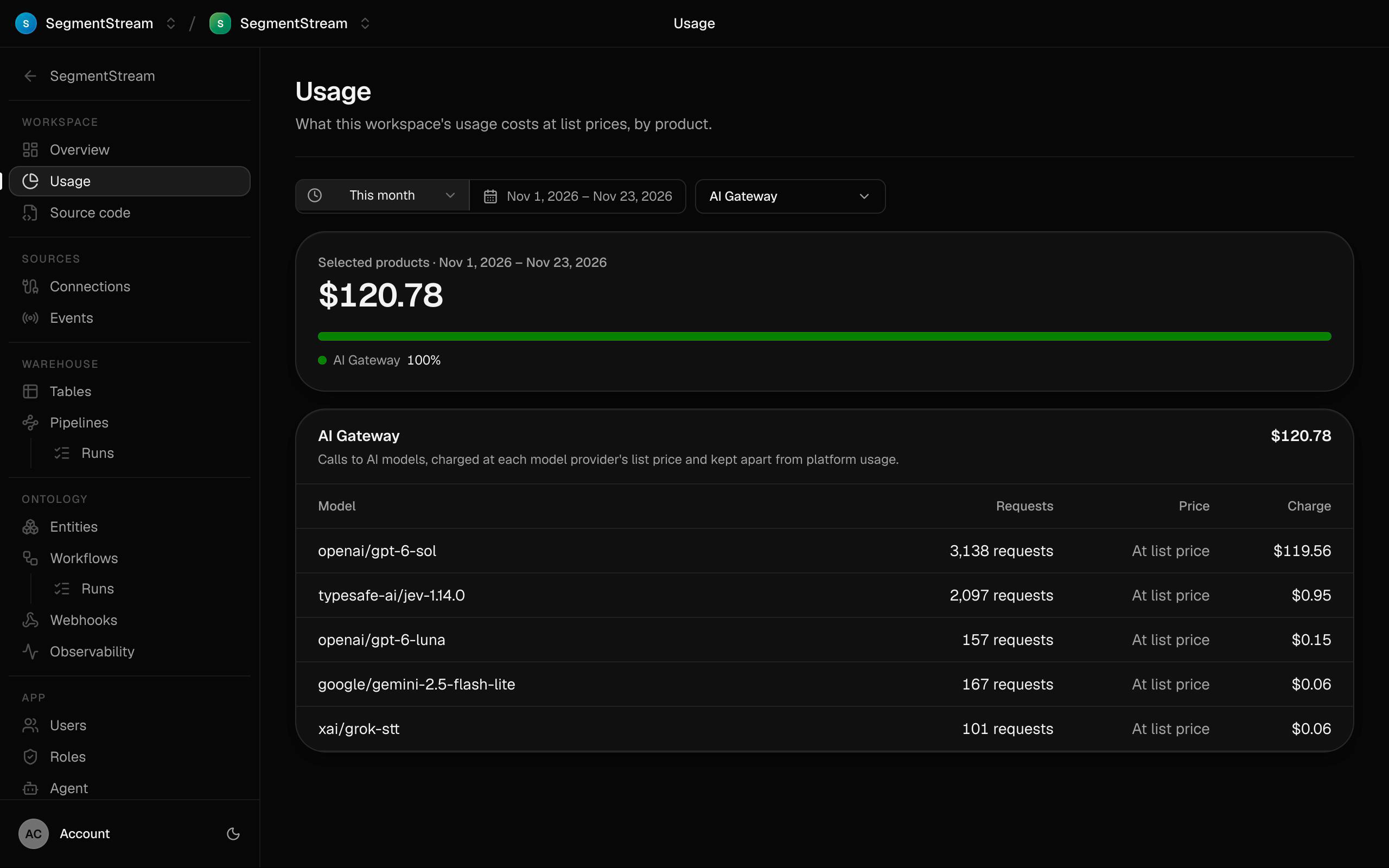
AI Gateway gives every SegmentStream workspace access to models from every major provider. Your company agent, your workflows and your pipelines call a model by its id, such as openai/gpt-6-luna or google/gemini-2.5-flash-lite. There is no API key to create or store. Each role can get its own model, and every call shows up on your Usage page, by model.
What's new
- Models from OpenAI, Anthropic, Google, xAI and other providers, named by model id.
- No API keys: the platform authenticates every call.
- The company agent picks its model by the roles of the person it talks to.
- A workflow step calls a model with one function call.
- Pipelines classify and score records with AI evaluation.
- Model calls are billed at each provider's list price, with no markup.
- The Usage page shows requests and spend for each model.
Every model, by id
A model is named by its provider and id, like openai/gpt-6-luna. Switching to another model is a one-line change in your repository, with nothing to sign up for at the new provider.
The same gateway serves every part of the workspace. The company agent uses it to answer, to transcribe voice messages and to describe images people send. Workflow steps use it to draft, classify and summarise. Pipelines use it to evaluate records.
No API keys
The platform authenticates every call on behalf of your workspace. There is no key to create, rotate or leak, and none in your code, your environment or a chat. Every call is attributed to the workspace that made it.
A model per role
The company agent's models are set in agent/segmentstream.json. It picks a model by the roles of the person it is talking to, so your finance team can get a stronger model than everyone else. Preview deployments can use a cheaper one.
{
  "models": {
    "chat": {
      "default": "openai/gpt-6-luna",
      "byRole": { "finance": "anthropic/claude-opus-5.5" },
      "preview": "google/gemini-2.5-flash-lite"
    },
    "stt": "spacexai/grok-stt",
    "imageDescription": "google/gemini-2.5-flash-lite"
  }
}
In workflows
A workflow step that needs one answer from a model makes one call: draft a follow-up, sort a lead, summarise a document. The step reads records through the ontology, so the model only sees what the workflow's role allows.
async function draftFollowUp(input: { lead: string }) {
  "use step";
  const lead = await run(Lead.get(input.lead));
  const { text } = await generateText({
    model: "openai/gpt-6-luna",
    system: "Write a short follow-up email to this lead. Use only the facts given.",
    prompt: JSON.stringify({ name: lead.name, company: lead.company }),
  });
  return { text };
}
AI evaluation
For judgements over many records, pipelines use AI evaluation. You ask typed questions about a record: yes or no, a choice between grades, or a score. The criteria are written in plain language. Each answer comes back as a probability, so you set the threshold that suits you.
To change what a grade means, you edit the text. The next run applies the new definition, with no model to train. Evaluation runs on a decision model built for this kind of judgement, and you declare it as a connection with nothing else to configure.
client = s.evaluation_client("evaluation")
result = client.evaluate(
    state={"job_title": "Head of Learning & Development", "company": "Acme"},
    questions={
        "grade": {
            "type": "choice",
            "instructions": "Which grade does this demo request match?",
            "criteria": {"A": "...", "B": "...", "C": "...", "D": "..."},
        },
    },
)
grade = result["answers"]["grade"]["choice"]
The pipeline writes each answer to a table in your warehouse, next to the data it judged. You can check the grades against real outcomes and refine the criteria.
Billed at list price
Model calls are billed apart from the platform, at each provider's list price with no markup. The Usage page shows them separately, by model, with the requests and spend for the period you choose. The only addition is the card processing fee on each purchase of credit. See pricing.
Try it
Install SegmentStream:
curl -fsSL https://segmentstream.com/install.sh | shThen tell your coding agent (Claude Code, Codex, Cursor or another) what the models should do. For example:
When a new lead arrives, have a workflow step draft a short reply
with openai/gpt-6-luna. Give the finance team's agent a stronger
model. Grade every demo request from A to D in a pipeline, with
the criteria written in plain text.
More on the AI Gateway page and the AI evaluation page.