
The Mailchimp alternative you own: your lists, their consent and your campaigns, with no bill per contact.
Subscribers, consent, audiences, campaigns and journeys in a workspace you own, on the same contacts as your customers and sales. Your agent writes, your team approves, and every email goes out from your own domain, with no charge per contact. We do the whole move off Mailchimp for you, side by side, until each campaign matches.
- First version in two weeks, at a fixed price
- Consent keeps its original dates
- Mailchimp keeps sending until each campaign has switched
- No charge per contact
SegmentStream replaces Mailchimp's audiences, campaigns and journeys with a workspace you own. Your subscribers come over with their status, tags, groups and consent history, your agent writes campaigns, your team approves them, and every email goes out from your own domain, with no charge per contact. Stay on Mailchimp if you rely on its landing pages, website builder or social posting. Move if you want your lists and their consent in your own hands. We do the whole move for you, side by side, until each campaign matches.
Stay on Mailchimp if
- You rely on Mailchimp's landing pages, website builder or social posting.
- Your team wants to keep building every email by hand, block by block.
Move to SegmentStream if
- Mailchimp is changing owners, and you want to decide where your lists and consent live.
- Your plan counts unsubscribed contacts, so keeping the record of who opted out costs money.
- You want subscribers on the same records as your customers, sales and support.
- You want your agent to draft campaigns and journeys, and your team to approve them.
We move you, if you want
Our engineers model your contacts and consent, take your contacts, groups, tags and consent records out of Mailchimp, rebuild segments and journeys, set up sending on your domain and run both side by side until each campaign matches. It starts with a fixed-scope pilot.
Request a pilot →Mailchimp is changing owners, and its plans count contacts you no longer email.
On 19 November 2026 Intuit agreed to sell Mailchimp to Bending Spoons for about $3.68 billion. The sale is expected to close in early 2027, subject to regulatory approval. Mailchimp's plans count subscribed, unsubscribed and non-subscribed contacts toward the plan's contact limit, and contacts above it appear as an additional charge on the bill.
- A change of owner is a natural moment to decide where your lists and their consent history live.
- Unsubscribed contacts still count toward a Mailchimp plan, so keeping the record of who opted out costs money.
- On your own stack a contact who receives nothing costs only its storage. You pay for the messages you send and for what runs.
- Your subscribers and their consent are the most valuable part of the account. Owning them makes the next renewal a choice.
Every contact, consent record and segment counted in Mailchimp and in your workspace, every night, until each campaign has switched. Mailchimp is never written to.
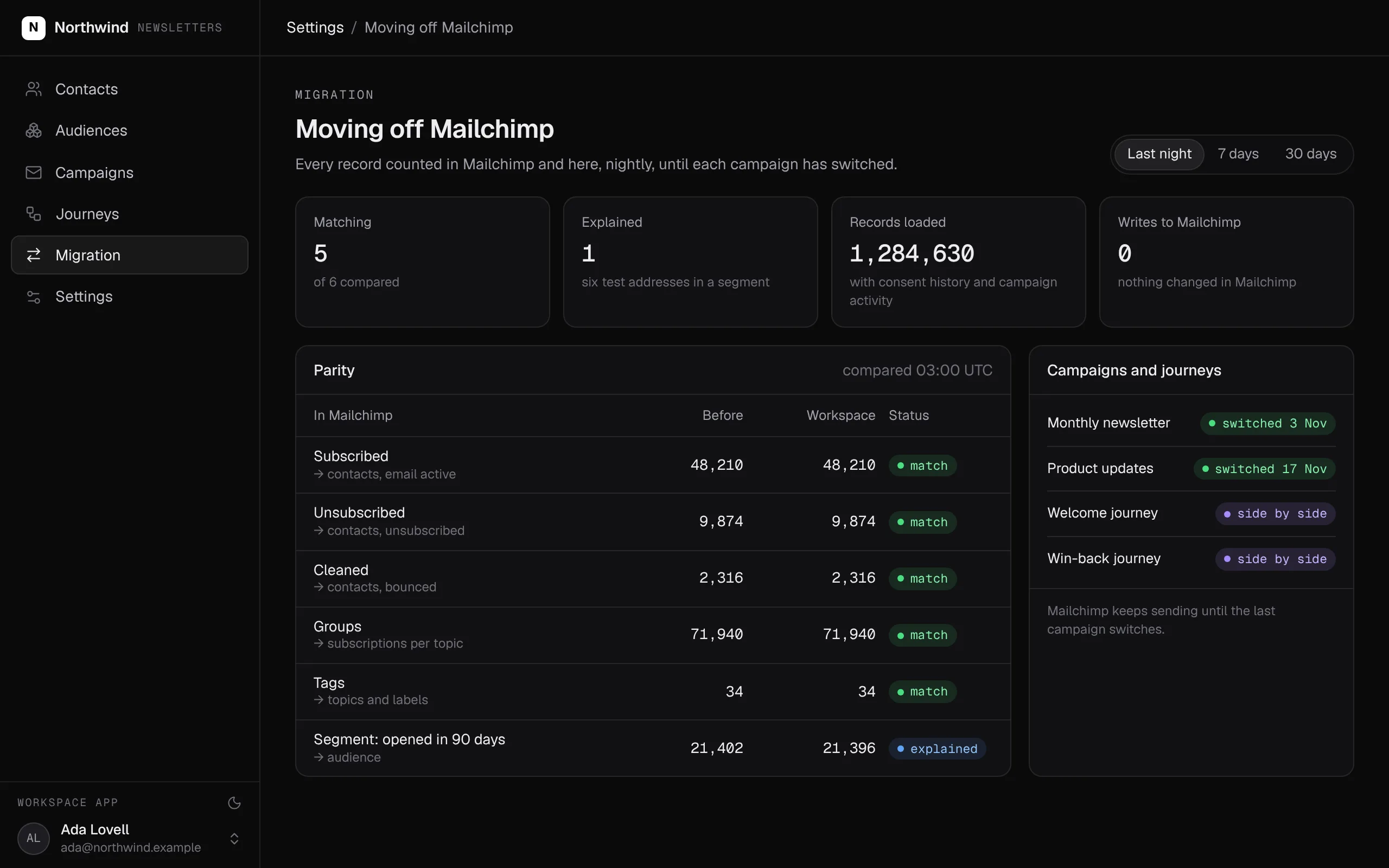
Swipe the screen sideways to see all of it.
What comes over, and what stays
What you bring from Mailchimp, and what you keep in the tools you like.
- Contacts with their status: subscribed, unsubscribed, cleaned or non-subscribed
- Merge fields, as properties named the way your team names them
- Groups and tags, as topics and subscriptions
- Opt-in dates and IP addresses, and the marketing permissions each person gave
- Segments, rebuilt and compared with Mailchimp's counts
- Campaign reports: sends, opens, clicks, bounces and unsubscribes
- Automations and journeys, rewritten one at a time as workflows
- Landing pages, websites, social posting and postcards, in the tools you choose for them
What the Mailchimp alternative does
Your team keeps every newsletter, campaign and journey it sends today, now on contacts you own beside your customers and sales. Consent is a record with its history, your agent drafts and your team approves, and your list can grow without a bill per contact.
- Every subscriber comes over with their status, tags, groups, opt-in date and IP address, and the marketing permissions they gave.
- Consent is a record per person and topic, kept with the date and source of every change.
- Audiences are definitions over your contacts, compared with Mailchimp's counts before anything depends on them.
- Tell your agent what to send: it writes the email in your template, picks the audience from your records, and nothing goes out before the role you choose approves it.
- Every send leaves out anyone unsubscribed, cleaned or who complained, whoever sends it.
- Journeys run as workflows: they wait, check consent and send, and every run is recorded.
- No charge per contact: you pay for what runs and for the messages you send.
What it covers
Every subscriber, with their consent →
Contacts come over with their status, merge fields, tags and groups, and with the opt-in date, IP address and marketing permissions Mailchimp recorded. Consent then lives on the contact, per topic, with the date and source of every change.
Audiences that stay current
Mailchimp's groups and segments become audience definitions over your contacts, so a list is never a stale export. Their sizes are compared with Mailchimp's before a single send depends on them.
Written by your agent, approved by your team
Tell your agent what to send in a sentence. It writes the email in your template, builds the audience from your records and prepares the send, showing who gets it and who is left out and why. It goes out only after the role you choose approves it.
Consent checked on every send
The send action leaves out anyone unsubscribed, cleaned or who complained, whoever calls it: a page, a workflow or an agent.
Journeys that run themselves →
Welcome series, re-engagement and date-based emails run as workflows: a sign-up, a schedule or a record change starts them, and they wait, check consent and send. Every run and every step is recorded.
Your domain, no bill per contact
Campaigns go out from your own domain, through Resend or the email service you choose. Your list can grow, and keep everyone who opted out, without moving you up a plan.
Every Mailchimp concept, and where it lives in your workspace
For your engineers: every Mailchimp concept and where it lives once you have moved.
| In Mailchimp | In your workspace | What to know |
|---|---|---|
| Audiences | contact entity with typed properties and history | One set of contacts for every list, beside your customers and sales |
| Subscriber status | emailStatus on the contact | Unsubscribed and cleaned become suppressions the send action refuses |
| Merge fields | Typed contact properties | Named as your team names them |
| Groups | subscription per contact and topic | Each opt-in keeps its date and source |
| Tags | Topics and labels on the contact | Imported as they are |
| Marketing permissions | Consent per contact and topic | Mailchimp's opt-in date and IP address are kept |
| Segments | Audience definitions over your contacts | Sizes compared with Mailchimp before any send depends on them |
| Campaigns | campaign and message entities with a send action | Approved by the role you choose; consent is checked inside the action |
| Automations and journeys | Workflows in ontology/workflows/ | Started by a sign-up, a schedule or a record change |
| Templates and the email editor | Your template in code, and each email written by your agent | A new layout is a sentence to your agent; your team reviews it |
| Sign-up forms | Forms on your site that call a subscribe action | Consent recorded with its date and source |
| Reports | Sends, opens, clicks, bounces and unsubscribes in your warehouse | Past campaign reports load from Mailchimp's API |
| Plans by contact count | Usage prices, with no seats or contact tiers | Sending is billed per message |
What SegmentStream does not do
- A drag-and-drop email editor. You don't need one: you tell your agent what to send, and it writes the email in your template, builds the audience from your records and prepares the send for approval.
- Landing pages, websites, social posting and postcards. Keep the tools you use for them, or build the pages you need in your app.
- Mailchimp's predicted demographics and send-time optimisation. Opens, clicks and orders land in your warehouse, and the models are yours to write.
How a migration from Mailchimp works
We do every step for you, or your team does it with its own agent and our engineers on call. Mailchimp keeps sending until each campaign has switched.
- 01
Model who you write to, and about what
The contact, subscription, audience, campaign and message entities are written with your properties, your topics and your consent rules, and the roles that may change them. The result is a change you read before anything moves.
- 02
Take your lists out of Mailchimp
Contacts load from Mailchimp's API with their status, merge fields, tags and groups, keeping the opt-in date, IP address and marketing permissions. Unsubscribed and cleaned addresses arrive as suppressions. Mailchimp keeps running throughout.
- 03
Rebuild segments as audiences
Each segment becomes an audience definition over your contacts, and its size is compared with Mailchimp's. A difference is explained, not ignored.
- 04
Set up sending on your domain
Sending is set up on your domain with SPF, DKIM and DMARC, and your template moves into code your agent maintains.
- 05
Move campaigns and journeys
The newsletter moves first, then each journey becomes a workflow, welcome series first. Your agent drafts them from a brief and your team approves.
- 06
Switch a campaign when it matches
Both systems run side by side, every send is compared, and a campaign moves only when its numbers match. Mailchimp stays until your plan says otherwise.
We move you off Mailchimp, end to end, if you want us to.
Our engineers model your contacts, topics and consent with your marketing team, take your contacts, groups, tags and consent records out of Mailchimp, rebuild your segments and the journeys that matter, set up sending on your domain, and run both side by side until each campaign matches. Or do it with your own agent and our help on call.
Nothing switches until the numbers match.
Both systems run side by side. Every number your teams rely on is compared, and every difference is explained before anything is turned off.
| Metric | Mailchimp | Workspace | Status |
|---|---|---|---|
| Subscribed contacts | 48,210 | 48,210 | match |
| Unsubscribed and cleaned | 12,190 | 12,190 | match |
| Segment: opened in 90 days | 21,402 | 21,396 | explained |
| Newsletter, October recipients | 47,688 | 47,688 | match |
| Welcome journey, week 1 sends | 1,214 | 1,214 | match |
- Mailchimp audiences and campaigns
- Mailchimp automations
- Constant Contact
Mailchimp keeps sending while you move. Contacts come over with their status, tags, groups and consent, and unsubscribed and cleaned addresses as suppressions. Each segment is rebuilt and compared with Mailchimp's count, the newsletter moves first, and journeys are rewritten one at a time. A campaign switches when its numbers match, and nothing is switched off before that. We do the whole move for you if you want: see the offer below.
Build your own from the Email marketing blueprint.
The Email marketing blueprint gives Claude Code, Codex or Cursor the design, the questions to ask you, the rules that must always hold and their tests. Paste this prompt and your agent builds your own version on SegmentStream, shaped to how your company works.
Read https://github.com/segmentstream/build-your-own/blob/main/AGENTS.md and follow it.
Build our Email marketing from the email-marketing blueprint.Enterprise, with our engineers
Our engineers model your contacts, topics and consent with your marketing team, take your contacts, groups, tags and consent records out of Mailchimp, rebuild your segments and the journeys that matter, set up sending on your domain, and run both side by side until each campaign matches.
Self-serve, with your own agent
Connect Mailchimp with an API key and set up sending on your domain, then tell your agent who you write to, about what, and who approves. It writes the contacts, consent, audiences and the send action, loads your lists, and segmentstream deploy gives you the app, the API and the MCP tools.
curl -fsSL https://segmentstream.com/install.sh | shRelated solutions
Read more
Questions
Is SegmentStream a Mailchimp alternative?
Yes, for newsletters and campaigns on contacts you own: your subscribers, their consent, audiences, campaigns and journeys live in a workspace you own, your agent drafts campaigns and your team approves them, and every email goes out from your own domain. Instead of an editor, you tell your agent what to send. Landing pages and social posting stay in the tools you like.
How do we make emails without a drag-and-drop editor?
You tell your agent what to send, in a sentence, such as the November update to current clients and newsletter subscribers, but not to anyone emailed this week. It writes the email in your template, builds the audience from your own records, and prepares the send so you see how many people get it and who is left out and why: unsubscribed, bounced or emailed too recently. It sends your team a test, and a person approves. A new layout is another sentence to your agent.
Do we have to move before the sale closes?
No. Intuit expects the sale to close in early 2027, and nothing on this page depends on what Mailchimp's new owner decides. Move if you want your lists and their consent in a database you own. Both run side by side during the move, so there is no deadline to meet.
Can we migrate from Mailchimp without losing consent?
Yes. Contacts load from Mailchimp's Marketing API with their status, merge fields, tags, groups, opt-in date and IP address, and marketing permissions, or from an audience export, which includes unsubscribed and cleaned contacts. Unsubscribed and cleaned addresses arrive as suppressions, so the send action refuses them from the first day.
Which email services can we use?
Any of them: Amazon SES, Resend, SendGrid, Mailgun, Postmark, SparkPost or Brevo. We set up whichever you use as part of the migration.
How do journeys work without Mailchimp's journey builder?
A journey is a workflow file in your repository: steps that wait, check consent and send, started by a sign-up, a schedule or a record change. Your agent writes it from a plain-language description, your team reviews the change, and every run and step is recorded.
What happens to our sign-up forms?
Forms on your site call a subscribe action through an API key that can subscribe people and do nothing else. Consent is recorded with its date and source, and a double opt-in is a workflow that sends the confirmation email and waits for the click.
Who handles deliverability?
Your authenticated domain: SPF, DKIM and DMARC, and dedicated IPs if you have them. We configure them with you during the migration. The workspace keeps the suppression truth: a bounced, complained or unsubscribed address is recorded on the contact and the send action refuses it, whoever or whatever is sending.
How long does a Mailchimp migration take?
Our engineers put the first version in your workspace in two weeks at a fixed price, usually contacts, consent, audiences and the newsletter. Each further campaign and journey switches when its numbers match Mailchimp's. Nothing is switched off before that.
What does it cost to run?
You pay for what your software uses, at the published prices, with AI models at each provider’s list price. No seats, no feature gates and no tiers by contact count: sending is billed per message.
Who owns the code and the data?
You do. The code lives in a private git repository for your workspace; clone it with plain git, keep a copy wherever you like, take it with you. The database and the warehouse are yours, with no limit on API calls and full agent access within the roles you give. SegmentStream runs it.
Rather have it moved for you? Request a pilot.
Our engineers model your contacts, topics and consent with your marketing team, take your contacts, groups, tags and consent records out of Mailchimp, rebuild your segments and the journeys that matter, set up sending on your domain, and run both side by side until each campaign matches.
- One solution, on your data, in your own workspace
- First version live in two weeks
- Parity proven before anything is switched off
- Fixed scope and price, credited to your contract if you continue
Not ready for a pilot? Send the form anyway with your question. An engineer will reply, not a sales rep.
How the pilot worksBuild your company’s own software. Let agents run it.
$ segmentstream workspace create acme --region eu --subdomain acme
▸ Created workspace acme · database, warehouse and a private git repository
$ segmentstream workspace WORKSPACE-ID clone acme && cd acme
▸ your coding agent builds what your team asked for and runs the checks
$ git add -A && git commit -m "First version"
$ segmentstream deploy
▸ app, company agent, API and MCP tools live for your invited members
Our engineers build the first version on your data in two weeks, at a fixed price.
Or build it yourself with your coding agent:
curl -fsSL https://segmentstream.com/install.sh | sh