
A support desk on your own customer records, on the inbox you already use.
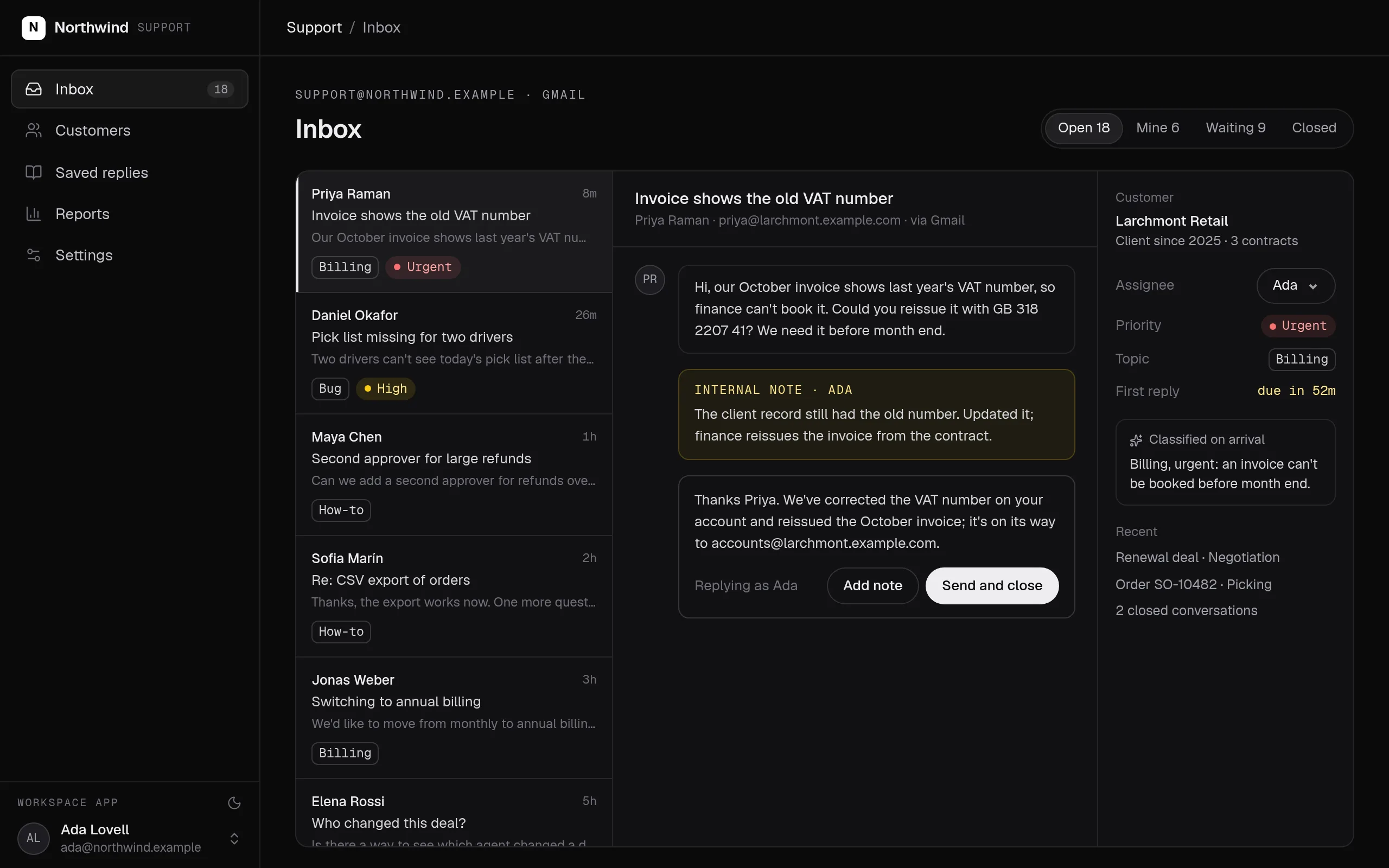
Conversations from your shared inbox arrive through a connection to Gmail, Help Scout or the helpdesk you use. Each one lands on the customer's record with its status, owner, priority and topic, and replies go back out from the same address.
The shared inbox, connected through Gmail. Each conversation is classified on arrival and sits on the customer's record.
Swipe the screen sideways to see all of it.
Support desk: what it does
Connect your support inbox and tell your agent how your team triages. It writes the ingestion, the classification, the ticket actions and the inbox page.
- Conversations arrive from Gmail, Help Scout or your helpdesk through a connection, on the schedule you set.
- Each one is classified by topic and urgency on arrival, against categories you can read and edit.
- Tickets sit on the customer's record, beside their contracts, orders and deals.
- Status, owner, priority and notes change only through actions; replies go out as the member who wrote them.
- Response times are SQL models, so the report and the inbox agree.
What it covers
Your inbox, connected →
Gmail, Help Scout or the helpdesk you use connects, and customers keep writing to the address they know.
Triage on arrival →
Each new conversation is classified by topic and urgency against categories written in plain language, through the evaluation connection.
Tickets on the customer record
Every conversation sits on the customer's record, next to their contracts, orders and open deals, so nobody answers blind.
Replies and internal notes
Status, owner, priority and internal notes change only through actions, with history. Replies go out from your support address through Resend, as the member who wrote them.
Response times and reports
First-reply and resolution times by topic, member and customer, as SQL models your team can read.
The company agent →
Ask which urgent tickets are waiting for a reply in Slack, Teams, WhatsApp, Telegram or email, and get an answer with your own permissions.
Built from typed blocks
No new product to buy: the blocks below, written by an agent into your workspace's repository and deployed with one command.
$ segmentstream deploy
Every block ships together from one git repository your company owns. SegmentStream runs it.
- conversation id
- status
- priority
- topic
- client
- owner
- assign
- reply
- body
- ticket
- author
- title
- body
- topic
- name
- plan
- ticket
- contract
- deal
The rule is code, not a setting someone can skip.
Every change goes through an action. The role that may run it is checked first, then the rule inside it. The same check applies to people in the app, to API keys and to agents over MCP.
const mail = connection("resend", { description: "Sends replies from the support address." });

export const Ticket = entity("ticket", {
  description: "What the team decided about one support conversation.",
  properties: {
    conversationId: p.text({ unique: true, description: "The id in the inbox." }),
    customer: p.email({ description: "Who wrote in." }),
    subject: p.text({ description: "The conversation's subject." }),
    status: p.select(TICKET_STATUS, { default: "open", managed: true }),
    priority: p.select(PRIORITIES, { default: "normal", managed: true }),
    replies: p.integer({ default: 0, managed: true, description: "Replies sent so far." }),
  },
  relationships: {
    client: rel.one("client", { optional: true, inverse: "tickets" }),
    owner: rel.one(User, { optional: true, inverse: "tickets" }),
  },
}).actions((self) => ({
  reply: action({
    description: "Reply to the customer from the support address.",
    input: Schema.Struct({ ticket: self.ref, text: Schema.String }),
    connections: [mail],
    prepare: ({ input }) =>
      Effect.gen(function* () {
        const ticket = yield* self.get(input.ticket);
        const sent = ticket.replies + 1;
        // The email goes out even if the transaction fails, so its key comes
        // from the record: a retry reaches the same email, not a second one.
        const response = yield* mail.post("/emails", {
          headers: { "Idempotency-Key": `ticket:${ticket.id}:reply:${sent}` },
          json: { from: SUPPORT, to: ticket.customer, subject: `Re: ${ticket.subject}`, text: input.text },
        });
        if (!response.ok) {
          return yield* new ActionRejected({ message: "The reply was not sent." });
        }
        return { sent };
      }),
    handler: ({ input, prepared }) =>
      Effect.gen(function* () {
        const ticket = yield* self.get(input.ticket, { forUpdate: true });
        if (ticket.replies + 1 !== prepared.sent) {
          return yield* new ActionRejected({ message: "Someone replied first. Read the thread again." });
        }
        yield* self.update(ticket, { status: "waiting", replies: prepared.sent });
      }),
  }),
}));Your inbox and tools, connected once.
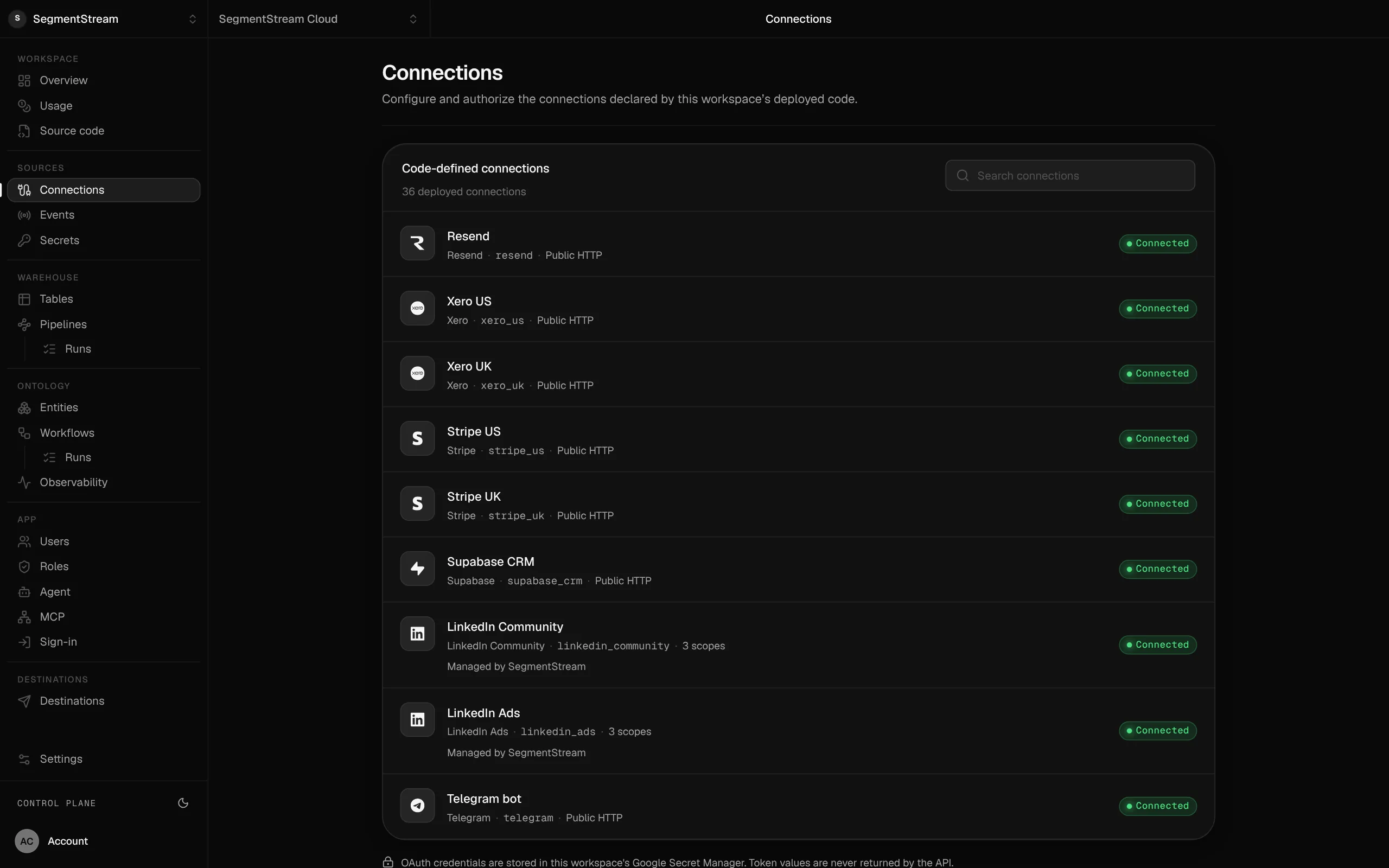
Connections are declared in code and authorised in the console; the credentials stay with the platform.
- Zendesk
- Freshdesk
- Front
- shared-inbox spreadsheets
We can do the whole move for you.
Our forward-deployed engineers take the migration end to end: the model, the export, the import, the side-by-side comparison, and the switch. It starts with a fixed-scope pilot, and nothing is switched off until the numbers match.
Enterprise, with our engineers
Our engineers connect your inbox or helpdesk, load your history, write the triage categories with your team and build the inbox, then run it beside your current tool until the team switches.
Self-serve, with your own agent
Connect your support inbox and tell your agent how your team triages. It writes the ingestion, the classification, the ticket actions and the inbox page.
curl -fsSL https://segmentstream.com/install.sh | shRelated solutions
Questions
Do we need to move our support email?
No. Your support address stays in Gmail, Help Scout or the helpdesk you use. The workspace reads new conversations through a connection and replies from the same address, so customers see no change.
How is a conversation classified?
A decision model reads each new conversation and picks a topic and an urgency from categories written in plain language. Change a category by editing its text; every ticket records the version that classified it.
Can an agent help answer?
Any agent connected over MCP can read a conversation and draft a reply as a note, with the permissions of the member it works for. Who may send is decided by your roles.
Rather have it built for you? Start a pilot.
Our engineers connect your inbox or helpdesk, load your history, write the triage categories with your team and build the inbox, then run it beside your current tool until the team switches.
- One solution, on your data, in your own workspace
- First version live in two weeks
- Parity proven before anything is switched off
- Fixed scope and price, credited to your contract if you continue
Not ready for a pilot? Send the form anyway with your question. An engineer will reply, not a sales rep.
How the pilot worksBuild your company’s own software. Let agents run it.
$ segmentstream workspace create acme --region eu --subdomain acme
▸ Created workspace acme · database, warehouse and a private git repository
$ segmentstream workspace WORKSPACE-ID clone acme && cd acme
▸ your coding agent builds what your team asked for and runs the checks
$ git add -A && git commit -m "First version"
$ segmentstream deploy
▸ app, company agent, API and MCP tools live for your invited members
Our engineers build the first version on your data in two weeks, at a fixed price.
Or build it yourself with your coding agent:
curl -fsSL https://segmentstream.com/install.sh | sh