
Build your own Triple Whale, on a warehouse you own.
Triple Whale bundles a pixel, store and ad connectors, attribution, metrics, dashboards and an AI assistant into one plan priced by your GMV. SegmentStream has each of them as a building block. Your coding agent puts them together into store analytics you own, from an open blueprint, and you pay for what runs.
- Every block built in
- Built by your coding agent from an open blueprint
- Orders straight from Shopify
- No tiers by revenue
SegmentStream has every block Triple Whale is built from: real-time event collection, a warehouse, connections to Shopify and the ad platforms, pipelines, a metrics layer, destinations back to Meta and Google, and the app and agent your team uses. Your coding agent builds your store analytics from them, with ROAS, MER, CAC, attribution per order, cohorts and LTV as code you own and no tiers by revenue. Stay on Triple Whale if you rely on its benchmarks against other brands or want a one-click App Store install. Build your own if you want your store's numbers, and the rules behind them, in your own hands.
Stay on Triple Whale if
- You rely on benchmarks against other brands.
- You want a one-click App Store install and no setup at all.
Build your own if
- Your plan moves up a tier as your GMV grows, while you use it the same way.
- You want orders, visits and spend in your own warehouse, beside the rest of the business.
- You want attribution and metrics whose rules you can read and change.
- You want your agent to answer questions and build new reports on the same data.
We build it, if you want
Our engineers build it in your workspace with you: the tracker, the store and ad connections, the pipelines, the metrics and the dashboards. It starts with a fixed-scope pilot.
Request a pilot →Last reviewed November 2026 · Sources: Triple Whale pricing, Understanding Triple Whale plans, Triple Whale: BigQuery integration
Triple Whale prices by your GMV. Your sales grow, and so does the plan.
Triple Whale prices its paid plans, Foundation, Automate and Enterprise, by a combination of the brand's annual GMV and the package. As a business grows, it moves automatically to the plan for its revenue tier; an annual prepaid plan locks the tier for the year. Getting data into your own warehouse goes through its export options.
- A better year moves you up a tier, even when you use the tool the same way.
- Your orders already live in Shopify and your spend in the ad platforms. The layer that turns them into ROAS and LTV can be yours.
- On your own stack the bill follows what runs, not your revenue.
- Your coding agent builds that layer from blocks the platform already runs, and keeps it up to date.
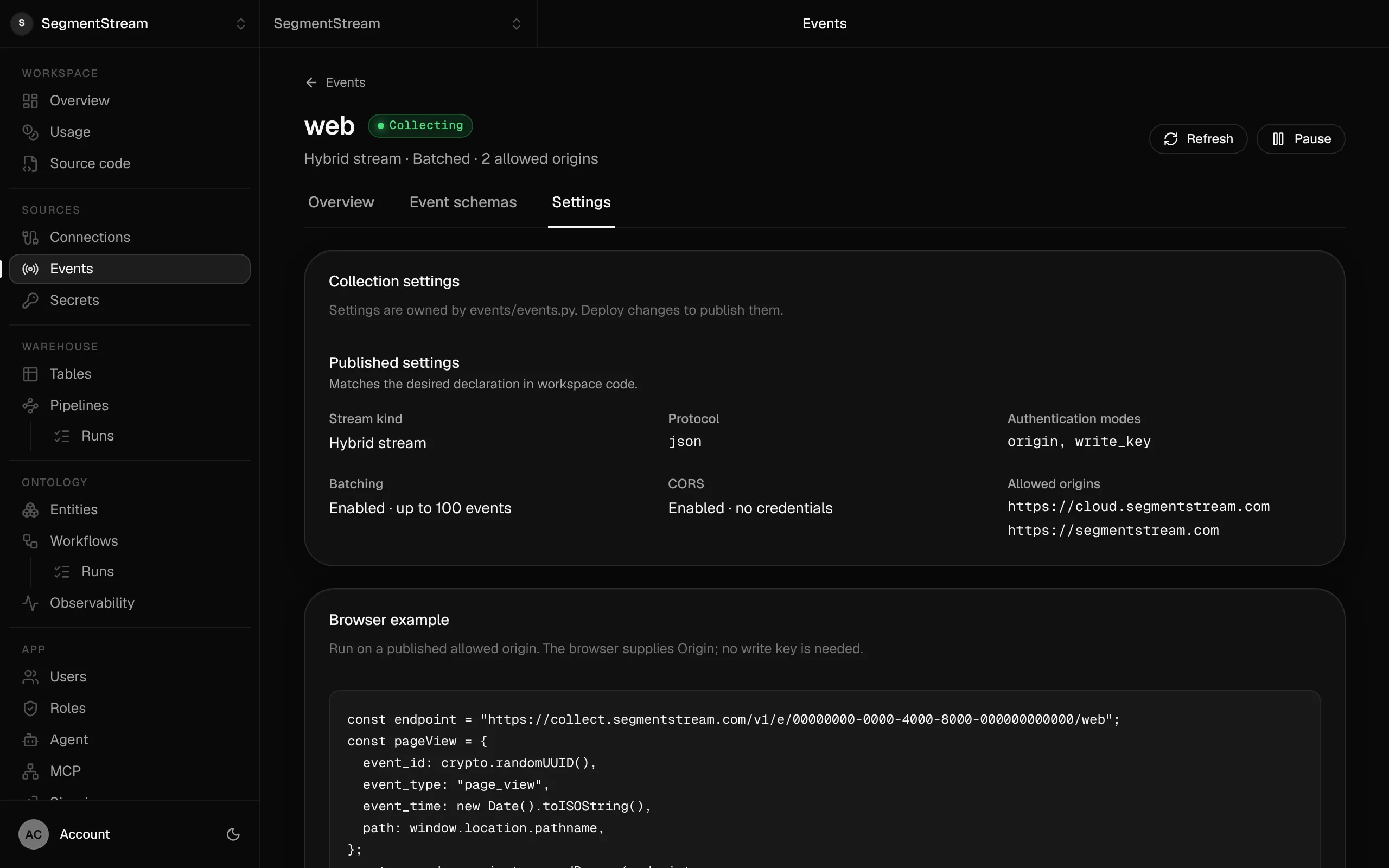
Event collection, built in: your storefront's tracker sends to an endpoint of your own, and every event lands in your warehouse as it arrives.
Swipe the screen sideways to see all of it.
What you build
Your team keeps the numbers it opens every morning, revenue, ROAS, MER, CAC and LTV, now built by your own agent from your orders, visits and spend, in a warehouse beside the rest of the business. Every number follows a rule you can read and traces back to the orders behind it.
- Your own tracker on your storefront, with the consent banner you choose; every visit lands in your warehouse as it arrives.
- Orders, customers, products and refunds straight from Shopify, with their full history.
- Daily spend from Google, Meta, TikTok and your other ad platforms.
- Revenue, ROAS, MER and new-customer CAC per channel and campaign, defined once as metrics.
- Each order with the visits and channels behind it, first and last click side by side.
- Cohorts and LTV by first-order month, channel and product.
- Purchases sent back to Meta and Google from your own orders.
- Dashboards in your own app, and an agent that answers from the same metrics.
Every block, built in
Real-time event collection →
Your agent adds a first-party tracker to your storefront, with the consent banner you choose. Events go to an endpoint of your own and land in your warehouse as they arrive, with no third-party tag and no ingestion job.
A warehouse, built in →
Each workspace has its own warehouse in the region you choose, with nothing to set up or license separately. Orders, visits and spend meet there without exports, and anyone you allow can query it.
Shopify and your ad platforms →
Orders, customers, products and refunds come from Shopify's Admin API through an app of yours, and spend from Google, Meta, TikTok, Microsoft, LinkedIn and X through managed connections. The tokens stay with the platform.
Pipelines for attribution →
Sessions, an identity graph, spend matched to the visits it paid for, first- and last-click attribution per order, cohorts and LTV, as models in your repository. They run on a schedule, with checks, retries and backfills when a rule changes.
A metrics layer →
Revenue, ROAS, MER, new-customer CAC, AOV and LTV are defined once, with your rules for refunds and a new customer. Dashboards, your agent and any agent over MCP answer from the same definitions.
Destinations back to Meta and Google →
Purchases built from your own orders go to Meta's Conversions API and to Google Ads as offline conversions, from a destination in your pipeline, through a connection that holds the token.
Dashboards in your own app →
Summary, channels, orders and cohorts as pages in your workspace's app, at your own address, behind sign-in, with the roles you give each person. Ask your agent for another view and it adds the page.
An agent that knows the numbers →
Ask in Slack, Telegram, WhatsApp or the app, such as what Meta cost per new customer last week. The company agent answers from the same metrics as the dashboards, with the roles of the person asking.
Built from an open blueprint →
Your coding agent builds it from the open marketing analytics blueprint: it asks how your store sells, writes a plan for you to approve, turns every rule into a test and deploys with one command.
Everything Triple Whale does, and the block that builds it
For your engineers: each part of Triple Whale, and the SegmentStream block your agent builds it from.
| In Triple Whale | The block in SegmentStream | What to know |
|---|---|---|
| Pixel | Event collection: your own first-party tracker and event stream | Events land in your warehouse as they arrive, in your region |
| Shopify integration | A Shopify connection, through an app of yours | Orders, customers, products and refunds with their full history |
| Ad platform integrations | Managed connections to Google, Meta, TikTok, Microsoft, LinkedIn and X | Daily cost per campaign; the tokens stay with the platform |
| Data warehouse and exports | The workspace's own warehouse | Query it directly, with no export step |
| Attribution models | Pipelines: first- and last-click attribution per order | Models in your repository; another model is a change you ask your agent for |
| Summary metrics | The metrics layer | Revenue, ROAS, MER, new-customer CAC and AOV, defined once with your rules |
| Cohorts and LTV | Pipelines and metrics | By first-order month, channel and product |
| Dashboards | Pages in your workspace's app | At your own address, behind sign-in, with roles |
| AI assistant | The company agent, and any agent over MCP | Answers from the same metrics, as the member asking |
| Conversions sent to ad platforms | A destination in your pipeline | Meta's Conversions API and Google Ads offline conversions, through a connection that holds the token |
| Plans by GMV | Usage prices | No seats or revenue tiers; your bill follows what runs |
What SegmentStream does not do
- Benchmarks against other brands. Your workspace holds only your own data.
- A one-click Shopify App Store install. Your store connects through an app of yours, set up with you.
How your agent builds it
Each step is a prompt to your coding agent or a click in the console. Triple Whale keeps running while you build.
- 01
Create a workspace
Paste one prompt into Claude Code, Codex or Cursor. The agent installs the SegmentStream CLI and creates a workspace in the region you choose, with event collection, the warehouse, pipelines and the app already in it.
- 02
Give it the blueprint
Point the agent at the open marketing analytics blueprint. It asks how your store sells: your currency and time zone, what counts as a new customer, how refunds count, and the consent banner you want.
- 03
Approve its plan
Before it writes code, the agent writes a one-page plan: the tracker, the pipelines, the metrics, the dashboards and what it leaves out. Nothing is built until you approve it.
- 04
Connect Shopify and your ad accounts
Only you can. Shopify connects through an app of yours and each ad platform through its own consent page. The tokens stay in SegmentStream, never in the code or the chat.
- 05
Deploy and put the tracker on
The agent turns every rule into a test and deploys with segmentstream deploy. Orders and spend load with their history, and visits arrive as soon as the tracker is on your storefront.
- 06
Open the dashboards
Invite your team to the app and ask the agent for any view you want. When you are ready, ask it to send purchases back to Meta and Google.
We build it for you, if you want us to.
Our engineers build your store analytics in your workspace: the tracker with your consent rules, the Shopify and ad connections, the attribution and cohort pipelines, the metrics and the dashboards your team opens every morning. Or build it with your own agent, with our engineers on call.
- Triple Whale
- Northbeam
- Polar Analytics
Nothing in Triple Whale changes while you build: your agent connects the same store and ad accounts and adds its own tracker beside the pixel. Your team moves over when the new dashboards answer its questions. We build all of it for you if you want: see the offer below.
Build your own from the Marketing analytics blueprint.
The Marketing analytics blueprint gives Claude Code, Codex or Cursor the design, the questions to ask you, the rules that must always hold and their tests. Paste this prompt and your agent builds your own version on SegmentStream, shaped to how your company works.
Read https://github.com/segmentstream/build-your-own/blob/main/AGENTS.md and follow it.
Build our Marketing analytics from the marketing-analytics blueprint.Enterprise, with our engineers
Our engineers build it in your workspace: the tracker with your consent rules, the store and ad connections, the pipelines, the metrics and the dashboards your team opens every morning. Then advanced attribution, budget allocation and incrementality come from ten years of SegmentStream measurement, on the same data.
Self-serve, with your own agent
Tell your coding agent to build your store analytics from the marketing analytics blueprint. It asks how your store sells, adds your tracker, writes the pipelines, metrics and dashboards, and segmentstream deploy puts them live. You connect Shopify and your ad accounts.
curl -fsSL https://segmentstream.com/install.sh | shRelated solutions
Questions
Is SegmentStream a Triple Whale alternative?
Yes, one you build rather than a plan you buy. SegmentStream has every block Triple Whale is made of: event collection, a warehouse, connections to Shopify and the ad platforms, pipelines, a metrics layer, destinations, an app and an agent. Your coding agent builds revenue, ROAS, MER and new-customer CAC by channel and campaign, attribution per order, cohorts and LTV from them, on data in a workspace you own. It has no benchmarks against other brands.
What is it built from?
Blocks the platform already runs, in one workspace: real-time event collection from your own tracker, a warehouse in your region, connections to Shopify and the ad platforms, pipelines that run on a schedule with checks, a metrics layer, destinations that send data back out, an app your team signs in to and the company agent. There is nothing else to buy, host or wire together.
Do we need a warehouse of our own, such as BigQuery or Snowflake?
No. Each workspace has its own warehouse, in the region you choose when you create it. Your agent, your apps and the people you allow query it directly, from the console, the CLI or an app.
Do we keep Shopify?
Yes. Your store stays as it is. Orders, customers, products and refunds come from Shopify's Admin API through an app of yours, a custom app in your store's admin or one of your organization's, and the platform keeps its token.
What replaces the pixel?
Your own tracker. Your agent adds it to your storefront with the consent banner you choose, and every visit lands in your workspace's warehouse as it arrives. Orders join the visits before them through your identity graph.
What about our history?
Orders, customers and refunds come with their full history from Shopify, and spend from each ad platform. Visits start on the day your own tracker goes on your storefront, so attribution covers orders from then on.
Which attribution models are there?
First click and last click side by side, as models in your repository. Another model is a change you ask your agent for. Advanced attribution, budget allocation and incrementality are SegmentStream's measurement service, run with our experts on the same data.
Can purchases go back to Meta and Google?
Yes. Ask your agent to add a destination to your pipeline: purchases built from your own orders go to Meta's Conversions API and to Google Ads as offline conversions, through a connection that holds the token. The blueprint leaves it out until you ask for it.
Is there an AI assistant for the numbers?
The company agent answers in Slack, Telegram, WhatsApp or your app, and any agent you connect over MCP does too, from the same metrics as the dashboards and with the roles of the person asking.
How long does it take to build?
With your own agent, most of the work is the agent's: you answer its questions, approve its plan and connect your store and ad accounts. Our engineers put the first version in your workspace in two weeks, at a fixed price.
What does it cost to run?
You pay for what your software uses, at the published prices, with AI models at each provider’s list price. No seats and no tiers by revenue or order volume.
We are an agency running Triple Whale for clients. Does this work for us?
Yes. Each client's store, spend and dashboards live in the client's own workspace, and your team reuses the same models from one client to the next. See our page for marketing agencies.
Who owns the code and the data?
You do. The code lives in a private git repository for your workspace; clone it with plain git, keep a copy wherever you like, take it with you. The warehouse is yours, with no limit on API calls and full agent access within the roles you give. SegmentStream runs it.
Rather have it built for you? Request a pilot.
Our engineers build it in your workspace: the tracker with your consent rules, the store and ad connections, the pipelines, the metrics and the dashboards your team opens every morning. Then advanced attribution, budget allocation and incrementality come from ten years of SegmentStream measurement, on the same data.
- One solution, on your data, in your own workspace
- First version live in two weeks
- Parity proven before anything is switched off
- Fixed scope and price, credited to your contract if you continue
Not ready for a pilot? Send the form anyway with your question. An engineer will reply, not a sales rep.
How the pilot worksBuild your company’s own software. Let agents run it.
$ segmentstream workspace create acme --region eu --subdomain acme
▸ Created workspace acme · database, warehouse and a private git repository
$ segmentstream workspace WORKSPACE-ID clone acme && cd acme
▸ your coding agent builds what your team asked for and runs the checks
$ git add -A && git commit -m "First version"
$ segmentstream deploy
▸ app, company agent, API and MCP tools live for your invited members
Our engineers build the first version on your data in two weeks, at a fixed price.
Or build it yourself with your coding agent:
curl -fsSL https://segmentstream.com/install.sh | sh