
The company agent, in a folder of your repository.
The extension behind the company agent in agent/. It gives the agent the workspace's ontology as tools, acting as the member who is talking to it, and puts it in your team's channels through the workspace's connections: unknown senders pair with a member first, voice messages become text, and groups are answered only when the agent is addressed.
Get started
$ npm install @segmentstream/agent eve@0.85.0At a glance
- One agent per workspace, in agent/, deployed with the rest
- Acts as the member who writes, with their roles
- Channels through the workspace’s connections; no tokens in code
- Open source under Apache-2.0
What it does
One folder
agent/ is an eve app, a package of its own like ontology/. You write the instructions; tools come from the ontology and the channel from a connection.
agent/├── package.json # eve and @segmentstream/agent, pinned├── segmentstream.json # channels and models; the platform reads it too└── agent/ ├── agent.ts # model, reasoning and limits ├── instructions.md # who the company is, how the agent behaves └── extensions/ └── segmentstream.ts # mounts the SegmentStream extensionMount the extension
The extension gives the agent the app's ontology as tools, acting as the member of each turn, and puts it behind the workspace's channels.
// agent/agent/extensions/segmentstream.tsimport { segmentstream } from "@segmentstream/agent/extension";import config from "../../segmentstream.json";export default segmentstream(config);// agent/segmentstream.json{ "channels": { "telegram": { "connection": "telegram", "policy": "smart" } }}A model per role
Choose the model once per session from the member's roles. Calls go through a model gateway with the deployment's own identity, so there is no key to configure. eve’s default tools stay off: the ontology is the tool surface, and `sandbox` adds bash and file tools in an isolated sandbox without network.
import { defineAgent } from "eve";import { segmentstream } from "@segmentstream/agent";export default defineAgent({ defaultTools: false, model: segmentstream.model({ default: DEFAULT_MODEL, // a gateway model id byRole: { accountant: FINANCE_MODEL }, }), reasoning: "medium", limits: { sessionUsage: ({ window }) => (window.costUsd ?? 0) >= 2 },});Pairing with a member
An unknown sender gets a link to the app's /agent/connect page. The member signs in and approves once, and from then on the agent acts as them. Members see and revoke their pairings in the app.
// app/src/app/api/agent/connect/route.tsimport { segmentstream } from "@/segmentstream";export const { POST } = segmentstream.agent.connectHandler();Run and deploy
Run it locally in the terminal, then deploy with the workspace. The platform registers the channels' webhooks after each production deploy; previews never answer real chats.
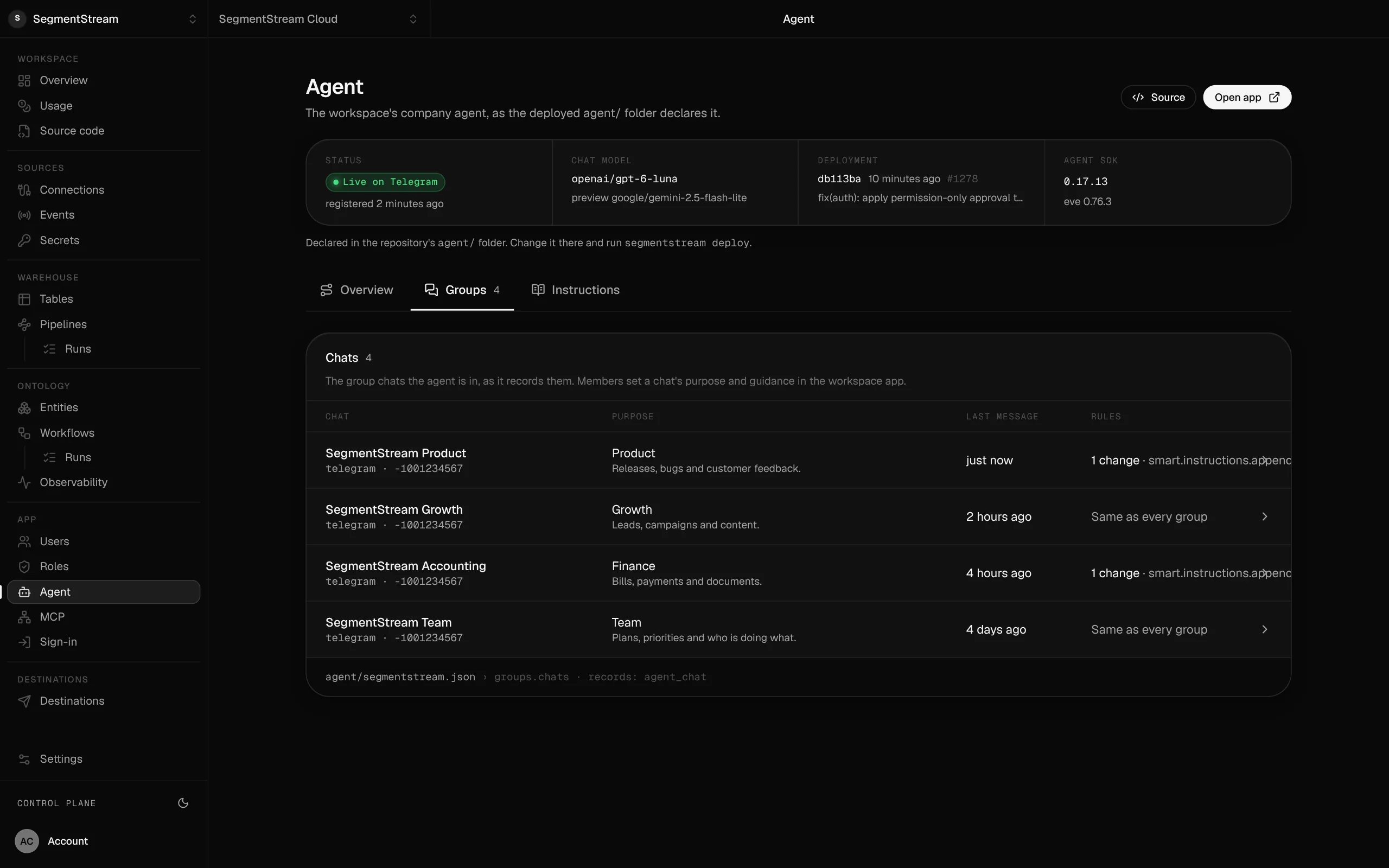
$ cd agent && npm install$ npx eve dev$ segmentstream deployWhat the Agent SDK deploys.
The company agent from agent/: its model, its deployment and the team chats it works in, each with its purpose.
The rest of the surface
Ontology SDK
@segmentstream-cloud/ontology
Entities, actions and roles; REST, OpenAPI and MCP from one model
App SDK
@segmentstream-cloud/app
Email-code sign-in, roles, records and warehouse data for Next.js
Pipeline SDK
segmentstream-pipeline (Python)
Connections, ingestion, models, checks and schedules in Python
CLI
segmentstream
Workspaces, deploys, members, jobs and data from the terminal
MCP and API
/mcp and /api/ontology on every app
REST, OpenAPI and MCP on every app, per caller
Build your company’s own software. Let agents run it.
$ segmentstream workspace create acme --region eu --subdomain acme
▸ Created workspace acme · database, warehouse and a private git repository
$ segmentstream workspace WORKSPACE-ID clone acme && cd acme
▸ your coding agent builds what your team asked for and runs the checks
$ git add -A && git commit -m "First version"
$ segmentstream deploy
▸ app, company agent, API and MCP tools live for your invited members
Our engineers build the first version on your data in two weeks, at a fixed price.
Or build it yourself with your coding agent:
curl -fsSL https://segmentstream.com/install.sh | sh