
A WhatsApp AI agent that answers each customer from their own records.
Customers write to your WhatsApp Business number. The agent signs them up with the role you name, answers from their own records, reads what they send, and lets your team review replies before they go out.
Every conversation on the customer's record, with its topic, priority and owner, where your team reads and reviews what the agent wrote.
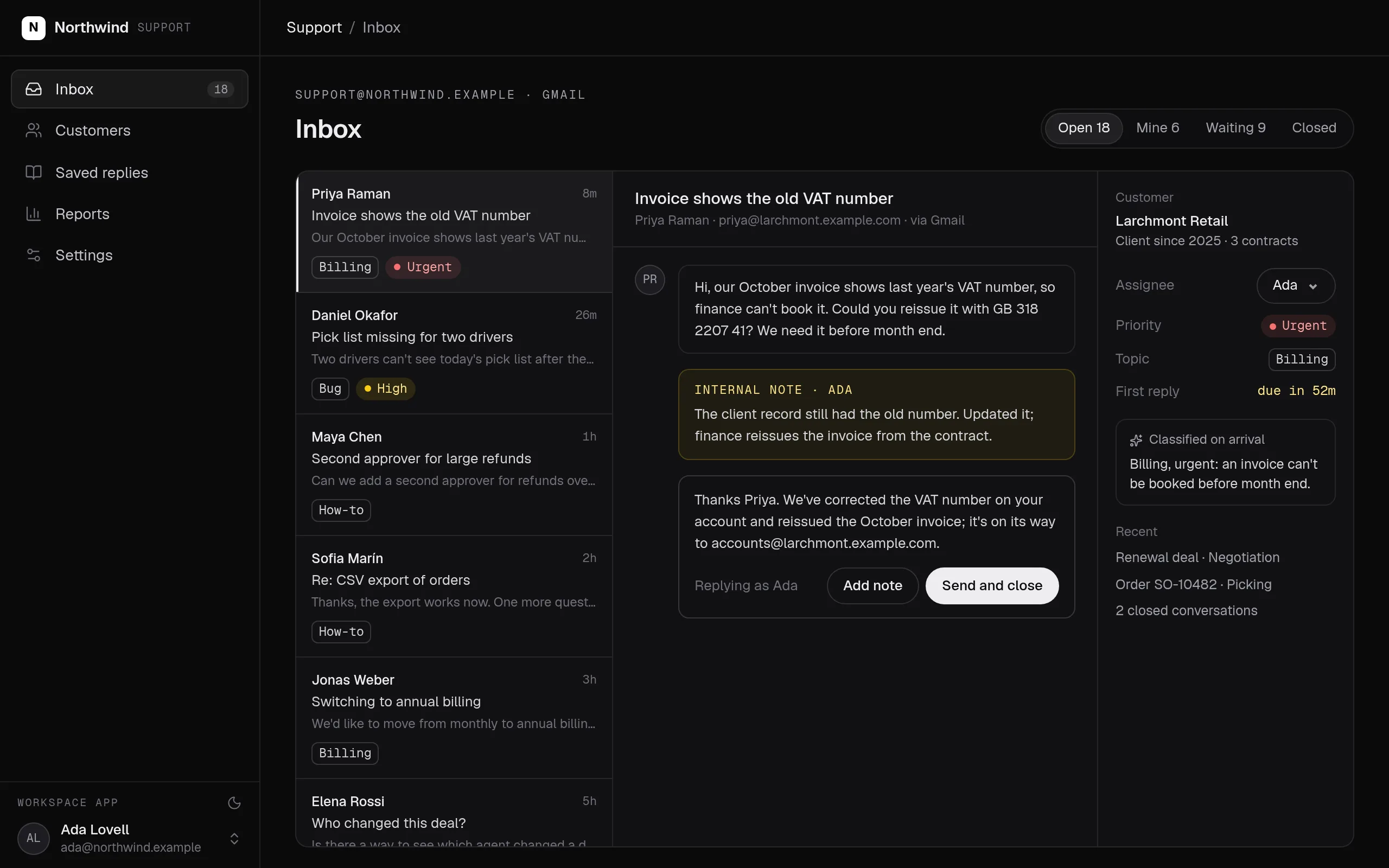
Swipe the screen sideways to see all of it.
WhatsApp AI agent: what it does
Tell your coding agent who should talk to the agent and what it may do. It writes the personas, the sign-up roles, the review rules and the actions in your repository, and deploys them with the rest of your workspace.
- Your WhatsApp Business number, connected in one step through Meta’s Embedded Signup.
- Customers sign up with their first message and get the role you name, scoped to their own records.
- The agent answers as your persona, reads voice notes, photos and documents, and attaches them to the right record.
- Each reply goes out at once, after a person approves it, or after review only when the agent is unsure.
- Changes wait for the customer to approve them, and every change is kept with who it was made for.
What it covers
Your number, connected in one step →
Connect your WhatsApp Business number in one step through Meta’s Embedded Signup. A number already in the WhatsApp Business app keeps working there.
Customers sign up by writing
A new customer signs up with their first message and holds only the role you name, which reads only their own records. Your team pairs their own WhatsApp accounts.
Voice notes, photos and documents
Voice notes are transcribed, and photos and documents are read, so the agent can answer them and attach them to the right record.
A person reviews what matters
Choose by role who sends each reply: the agent at once, a person always, or a person only when the agent is unsure.
Confirmation before changes
Before a change that matters, the customer sees what will happen, with approve and deny buttons only they can press.
Messages from your workflows
Workflows post exact messages to a customer’s chat, such as a booking confirmation, through the same number.
Built from typed blocks
No new product to buy: the blocks below, written by an agent into your workspace's repository and deployed with one command.
None required.
$ segmentstream deploy
Every block ships together from one git repository your company owns. SegmentStream runs it.
- WhatsApp chatbot builders
- A shared WhatsApp phone
- Per-conversation chatbot fees
Our engineers connect your number, set up sign-up, the persona and review on your own customer records, run the agent with your team reviewing replies until they match theirs, and hand over the code.
Build your own from the Company agent blueprint.
The Company agent blueprint gives Claude Code, Codex or Cursor the design, the questions to ask you, the rules that must always hold and their tests. Paste this prompt and your agent builds your own version on SegmentStream, shaped to how your company works.
Read https://github.com/segmentstream/build-your-own/blob/main/AGENTS.md and follow it.
Build our company agent from the company-agent blueprint.Enterprise, with our engineers
Our engineers connect your number, set up sign-up, the persona and review on your own customer records, run the agent with your team reviewing replies until they match theirs, and hand over the code.
Self-serve, with your own agent
Tell your coding agent who should talk to the agent and what it may do. It writes the personas, the sign-up roles, the review rules and the actions in your repository, and deploys them with the rest of your workspace.
curl -fsSL https://segmentstream.com/install.sh | shRelated solutions
Questions
Can I build my own WhatsApp AI agent for my business?
Yes. Connect your WhatsApp Business number, open sign-up on WhatsApp with a role scoped to the customer’s own records, and write the persona. The agent answers from those records and works through the actions you allow.
Can we keep using the WhatsApp Business app?
Yes. A number already in the WhatsApp Business app keeps working there after you connect it.
Can the agent message customers at any time?
Inside WhatsApp’s 24-hour customer-service window, yes. Outside it, Meta accepts only approved message templates, as it does for every WhatsApp Business number.
Can a customer see someone else’s data?
No. A customer holds only the role you name for sign-up, which reads only their own records, and every request is checked on the server.
What does a WhatsApp AI agent cost?
There is no seat, per-conversation or per-resolution fee. The agent’s work is billed in SSU under Agent, and the models it calls at each provider’s list price, with no markup.
Rather have it built for you? Start a pilot.
Our engineers connect your number, set up sign-up, the persona and review on your own customer records, run the agent with your team reviewing replies until they match theirs, and hand over the code.
- One solution, on your data, in your own workspace
- First version live in two weeks
- Parity proven before anything is switched off
- Fixed scope and price, credited to your contract if you continue
Not ready for a pilot? Send the form anyway with your question. An engineer will reply, not a sales rep.
How the pilot worksBuild your company’s own software. Let agents run it.
$ segmentstream workspace create acme --region eu --subdomain acme
▸ Created workspace acme · database, warehouse and a private git repository
$ segmentstream workspace WORKSPACE-ID clone acme && cd acme
▸ your coding agent builds what your team asked for and runs the checks
$ git add -A && git commit -m "First version"
$ segmentstream deploy
▸ app, company agent, API and MCP tools live for your invited members
Our engineers build the first version on your data in two weeks, at a fixed price.
Or build it yourself with your coding agent:
curl -fsSL https://segmentstream.com/install.sh | sh