An AI operations agent that runs your company’s routine work, in your team’s chats.
One agent for the whole company, in your team’s chats. It answers each person from the company’s records with their own permissions, changes data only through your actions after they confirm, and runs routine work on a schedule.
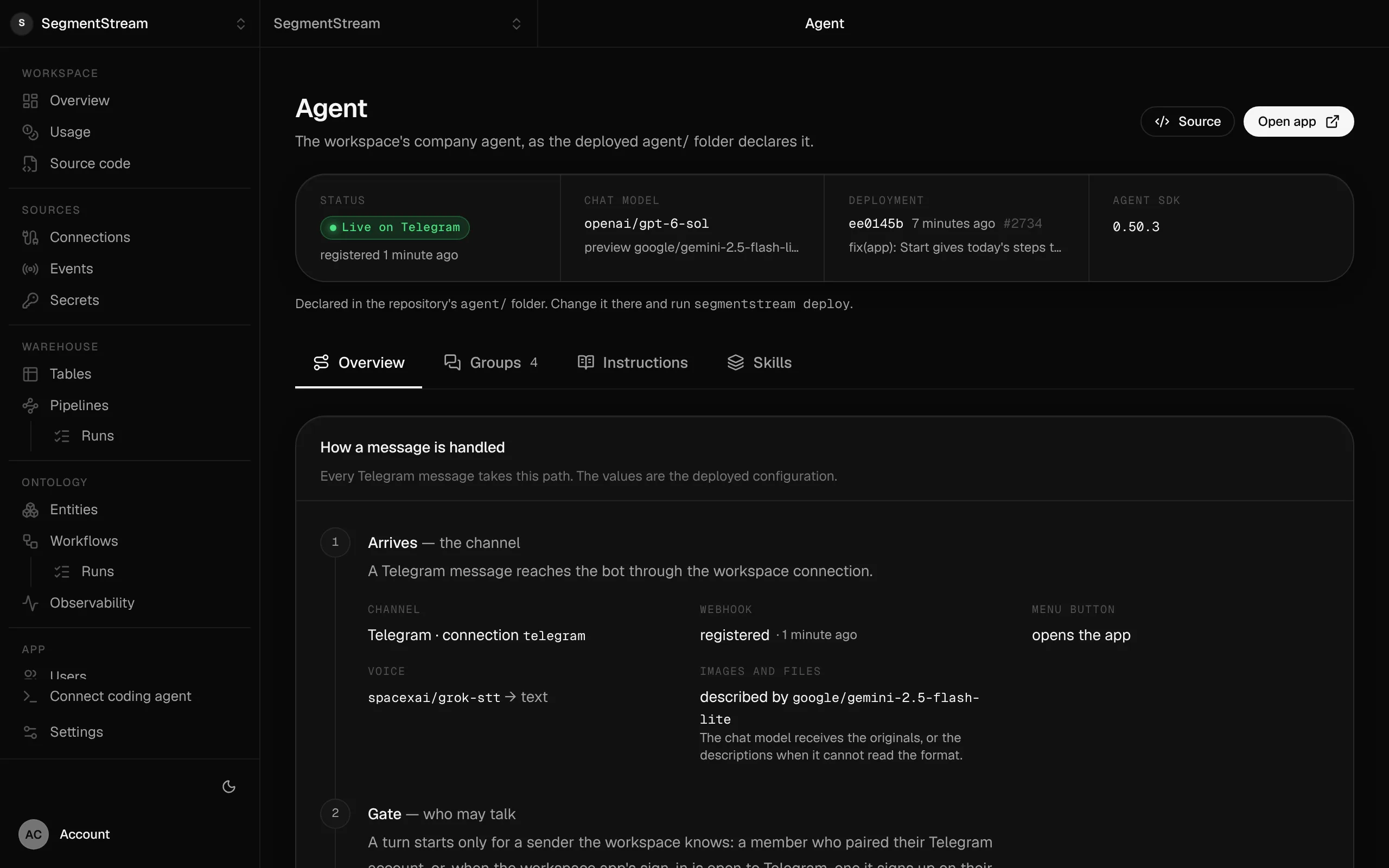
The agent as your repository declares it: the models it uses, the deployment it runs and every step a message takes.
Swipe the screen sideways to see all of it.
AI operations agent: what it does
Tell your coding agent who should talk to the agent and what it may do. It writes the personas, the sign-up roles, the review rules and the actions in your repository, and deploys them with the rest of your workspace.
- Ask in the chat you already use: what is overdue, which deals stalled, how this month compares with the last. Answers link to the records they came from.
- It acts as the person asking, with the roles they hold now, and asks before it changes anything that matters.
- Routines run on a schedule or when a record changes, and report where the work belongs.
- Each group has a purpose, so the agent knows what each chat is for, when to answer and when to stay quiet.
- Send it an invoice, a contract or a spreadsheet and it files it on the right record.
What it covers
Answers from your metrics →
Revenue, pipeline and overdue invoices come from metrics defined once in your ontology, so the agent and your dashboards give the same number.
Acts as the person asking
Each person connects once. The agent then works with the roles they hold at that moment, and the history of every change names them.
Confirms before it changes
Before it changes anything that matters, it shows the change and waits: confirm, edit or cancel.
Routines on a schedule →
Workflows start work on a schedule or when a record changes: reconcile yesterday’s bank lines, chase overdue invoices, find the leads nobody followed up.
Posts where the work belongs
It posts into a Slack channel, a Telegram group or a member’s WhatsApp after the person who asked approves the exact message.
Tools from your connections →
The services you connect, including any MCP server, become the agent’s tools under the same roles as everything else.
Built from typed blocks
No new product to buy: the blocks below, written by an agent into your workspace's repository and deployed with one command.
$ segmentstream deploy
Every block ships together from one git repository your company owns. SegmentStream runs it.
- Microsoft 365 Copilot
- ChatGPT Enterprise
- Slack AI
- Glean
- Lindy
- Zapier Agents
Our engineers map your team’s routine work, move it onto your workspace with the agent and its workflows, run it side by side until results match, and hand over the code.
Build your own from the Company agent blueprint.
The Company agent blueprint gives Claude Code, Codex or Cursor the design, the questions to ask you, the rules that must always hold and their tests. Paste this prompt and your agent builds your own version on SegmentStream, shaped to how your company works.
Read https://github.com/segmentstream/build-your-own/blob/main/AGENTS.md and follow it.
Build our company agent from the company-agent blueprint.Enterprise, with our engineers
Our engineers map your team’s routine work, move it onto your workspace with the agent and its workflows, run it side by side until results match, and hand over the code.
Self-serve, with your own agent
Tell your coding agent who should talk to the agent and what it may do. It writes the personas, the sign-up roles, the review rules and the actions in your repository, and deploys them with the rest of your workspace.
curl -fsSL https://segmentstream.com/install.sh | shRelated solutions
Questions
Can I build an AI agent that runs my company’s operations?
Yes. The agent works on your company’s records and rules: it answers each person with their own permissions, changes data only through your actions after they confirm, and runs routines on a schedule through workflows.
Does it act on its own?
Routines run under a narrow role of their own and mostly propose. Anything destructive, irreversible or external, such as sending, paying or deleting, waits for a person to confirm.
Where does the team talk to it?
Slack, Teams, WhatsApp, Telegram and email, and inside your own apps. Each group has a purpose, so the agent knows what each chat is for and when to stay quiet.
Which model does it use?
Every major model, chosen per role, for example a stronger one for finance, with no API key to manage. Models are billed at each provider’s list price.
What does an AI operations agent cost?
There is no seat, per-conversation or per-resolution fee. The agent’s work is billed in SSU under Agent, and the models it calls at each provider’s list price, with no markup.
Rather have it built for you? Start a pilot.
Our engineers map your team’s routine work, move it onto your workspace with the agent and its workflows, run it side by side until results match, and hand over the code.
- One solution, on your data, in your own workspace
- First version live in two weeks
- Parity proven before anything is switched off
- Fixed scope and price, credited to your contract if you continue
Not ready for a pilot? Send the form anyway with your question. An engineer will reply, not a sales rep.
How the pilot worksBuild your company’s own software. Let agents run it.
$ segmentstream workspace create acme --region eu --subdomain acme
▸ Created workspace acme · database, warehouse and a private git repository
$ segmentstream workspace WORKSPACE-ID clone acme && cd acme
▸ your coding agent builds what your team asked for and runs the checks
$ git add -A && git commit -m "First version"
$ segmentstream deploy
▸ app, company agent, API and MCP tools live for your invited members
Our engineers build the first version on your data in two weeks, at a fixed price.
Or build it yourself with your coding agent:
curl -fsSL https://segmentstream.com/install.sh | sh